








Mayer Sound

Spacemap GoSpatial Sound Design and Mixing Tool
空間サウンドデザインの簡易性と創造性を体験
  • GALAXYのパワーを、直感的なiPadアプリとプラグインで活用
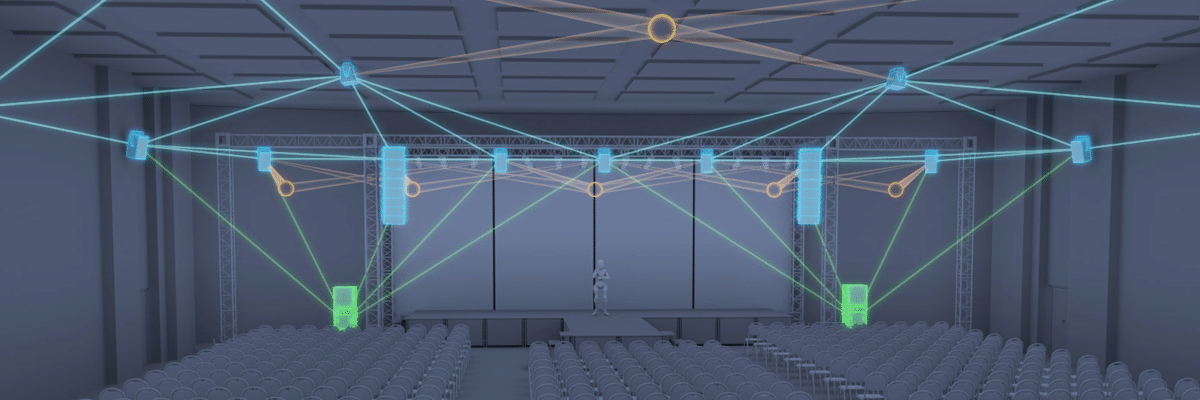
    Spacemap Goは、Meyer SoundのGalileo GALAXY Network Platformの処理能力を活用し、直感的なiPadアプリとして実現した空間サウンドデザイン&ミキシングツールです。世界中に展開されている何千ものGALAXYプロセッサーと、主要なDAWおよびコンソールプラットフォームとのシームレスな連携により、Spacemap Goはあらゆる空間サウンドデザイン&ミキシングツールの中で最も広範囲なシステム展開を可能にします。 これほどのパワーと制御機能を指先一つで実現できるサウンドデザインツールは他に類を見ません。
  • あなたの真の可能性を解き放つ
    Spacemap Goは、複雑なインターフェースや難解なアルゴリズムに煩わされることなく、クリエイティブな作業に集中することを可能にします。そのシンプルなiPadタッチスクリーンインターフェースにより、初めての方でもわずか数分で洗練された空間サウンドデザインを作成できます。 Spacemap Goは、無料のアプリケーション、およびDAWまたはコンソールプラグインとして提供されています。
  • 誰もが使えるサウンドデザイン
    Spacemap Goは、劇場、コンサート、サウンドアート・インスタレーション、企業プレゼンテーション、礼拝所など、どのような音響設計を行うプロフェッショナルに対しても、新しい創造的な機能を提供します。 主要なDAWプラットフォームやライブコンソールに対応しているため、Spacemap Goはプロの制作ワークフローにシームレスに統合されます。
  • すべてのコントロールを指先一つで
    Spacemap Go iPadアプリは、指先のスワイプ操作だけで、創造的なコントロールを完全に実現します。サウンドデザイナー、FOH(フロント・オブ・ハウス)エンジニア、ミュージシャン、DJなど、あらゆるオーディオエンジニアがわずか数分でアプリを習得できるシンプルさです。 内蔵のテンプレートとプリセットを活用し、すぐに使い始めることができます。Spacemap Goの直感的なタッチスクリーンインターフェースにより、複雑な動きも数秒で実行可能です。スナップショット機能により、サウンドの静的な配置や動的なムーブメントを簡単に管理できます。 現場で複数のiPadを同時に使用し、共同作業を行うことができます。 Spacemap Goの実際の動作をご覧ください。
あなたの創造手法を一新する
  • ライブおよび自動化ワークフローに対応
    Spacemap Goは、ほぼすべての制作ワークフローにシームレスに組み込まれます。AAX、AU、VST形式のDAW、およびAvidやSSLのライブコンソールと互換性があります。さらに、OSC対応デバイスや、QLabなどのキューベースのソフトウェアとも統合が可能です。 RTTrPMをサポートしているため、BlackTraxやその他のリアルタイムトラッキングシステムとの統合も可能です。
  • 大規模な創造を
    Spacemap Goは高い拡張性を備えており、ボールルームから講堂、アリーナ、または大規模なフェスティバルまで、あらゆる規模に空間サウンドデザインを適用できます。 複数のGALAXYプロセッサーを組み合わせることで、最大32入力、256出力のシステムを構成可能です。 Spacemap Goはあらゆるスピーカーシステムで使用可能ですが、最高の結果を得るためにはMeyer Soundのスピーカーをご使用ください。
  • COMPASSとの連携で、より強固な制御を
    Spacemap GoをMeyer SoundのCompassおよびCompass Goソフトウェアと連携させることで、GALAXY Network Platformの制御をさらに強固なものにできます。Spacemap Goでクリエイティブなプログラミングとリアルタイム操作を行い、CompassでEQ、ディレイ、ネットワークパラメータ、その他のデバイス設定を管理するという役割分担が可能です。
  • COMPASSとの連携で、より強固な制御を
    Spacemap GoをMeyer SoundのCompassおよびCompass Goソフトウェアと連携させることで、GALAXY Network Platformの制御をさらに強固なものにできます。 Spacemap Goでクリエイティブなプログラミングとリアルタイム操作を行い、CompassでEQ、ディレイ、ネットワークパラメータ、その他のデバイス設定を管理するという役割分担が可能です。
ソリューション
  • コンサート
    「Spacemap Goは、その柔軟性から私が選ぶ空間ミキシングツールになっただけでなく、新規ユーザーにとって最も使いやすいツールであることも理由です。」”
    Dennie Miller
    FOHエンジニア
  • 劇場
    「Spacemap Goのおかげで、これなしでは不可能だった、あるいはこれほど素早くはできなかった方法で、空間ミックスを自動化できるようになりました。素晴らしいワークフローで、クリエイティブな作業に集中できます。」”
    Leon Rothenberg
    トニー賞受賞サウンドデザイナー
  • ミュージアム
    「私たちは『Primal Energies』でSpacemap Goを大々的に使用しました。これは、音のダイナミックな空間化の背後にある『デジタルの脳』のようなものです... 私の目的においては、Spacemap Goは素晴らしいものです。」”
    Bill Fontana
    サウンドアーティスト
Spacemap Go Plugins (v1.2.0)
for Galileo GALAXY
REQUIRES SPACEMAP GO APP V1.2.0 OR HIGHER CONNECTED TO GALILEO GALAXY (ALL VERSIONS)
Released November 17, 2021
Spacemap Go App v1.2.0 can be downloaded on the Apple app store.

AAX VENUE
For Avid VENUE | S6L consoles running version 7 software or higher
Spacemap Go Plugin: AAX VENUE
2.45 MB
Spacemap Go Plugin: AAX VENUE Release Notes
AAX STANDARD/AU/VST
For DAWs with AAX Standard, AU or VST
Spacemap Go Plugin: DAW macOS
52.66 MB
Spacemap Go Plugin: DAW Windows
20.78 MB
Spacemap Go Plugin: AAX Standard Release Notes
39.43 KB
Spacemap Go Plugin: AU Release Notes
39.18 KB39.18 KB
Spacemap Go Plugin: VST Release Notes
9.22 KB
Spacemap Go リリースノート
Version 1.2.0
Spacemap Go 1.2.0 software requires the following firmware versions:
  • GALAXY Firmware v2.4.2 (All models)

NEW FEATURES AND ENHANCEMENTS

  • New default Spacemaps
  • Compatibility with Spacemap Go plugins
  • Supports ADM OSC reception
  • Manages AVB MILAN input connections between devices on the same AVB MILAN group
  • Can see and connect to MILAN CRF connections
  • Improved error notification and app behavior when the WiFi signal is lost
Version 1.1.0

NEW FEATURES AND ENHANCEMENTS

  • Tap Tempo button: A button that allows the user to tap in time with musical content to provide scaling of trajectory rate to sync with musical tempo, and fractional control
  • From Channel View, using Tempo Mode, when a trajectory is recalled with a different duration, the rate is scaled automatically.
  • Panners are now touchable/selectable in Mix Overview
  • Added support in the AVB Connection Manager to allow multiple assignments for a range of channels with a single tap
  • System Configuration View displays available clock types AAF, CRF
  • Added support for static IPv4 Network Address connection
  • Added support to allow external clocking to GALAXY from Avid VENUE S6L System with MLN-192 Milan Option Card
  • Panner locators on the edge of Channel Overview are now easier to touch
  • Crosshairs are now available in Mix Overview
  • The Overview allows stacking of panner locators
  • Added support to allow selection of a Spacemap to multiple channels in Mix or Channel Views
  • Create View allows swapping of wait times and transition times in the Trajectory Editor
  • Added support for new icons to display single or grouped Channel Snapshots
  • Added support to allow editing of Wait and Transition Times of Channel Snapshots that are grouped at the top-level
  • Added support to allow editing of the ID number in System, Mix, and Channel snapshots
  • Canvas Orientation in Settings View > Display Settings changes the orientation of Spacemaps to be Front, Back, Left, or Right
  • The progress of a Mix or Channel Snapshot is indicated with an animated outline around the Recall button
  • Text labels have been updated in the External Device Connection tab in Settings View
  • Added support to allow external clocking from an AAF stream in Settings View > System Configuration Tab
  • Added generalized alerts in the lower left-hand corner when the mix point limit is reached
  • When connecting to a system configured using a previous version of Spacemap Go, the System Configuration updated to the current version
Version 1.0.0

PRODUCT FEATURES

Available on iPadOS Software Only

Spacemaps

  • Spacemaps can provide many ways of matrix mixing to a set of loudspeakers. The matrix mix result is a combination of the selection of up to two Spacemaps for a channel, position on overlaid Spacemaps, and the Spacemap Crossfade value. Spread provides control over how much of the sound is distributed to all speakers in the Spacemap. Once Spacemaps are defined and selected for a venue, their use is quite intuitive.

Trajectories

  • Trajectories are time-sequenced paths of sound. Spacemap Go can play trajectories once or indefinitely, with modulation of scale in the X and Y directions, as well as rotation, rate, and position offset. This provides for quick access to spatial effects.

Mix View

  • Groups of individual input channel controls are provided. The Mix View in Spacemap Go organizes channels into four groups of eight.

Position

  • Independent positioning of 32 inputs within the Spacemap. Each input may use a different Spacemap configuration.

Level, Mute, Solo

  • Spacemap Go provides these new controls for Matrix Row level that are not available in Compass.

Channel Links

  • Channel links allow for odd/even pairs to be controlled in a synchronized fashion. Relative position of the pair of channels may be set to a number of modes including mono (both channels have the same position), near (channels are closely separated), far (greater separation), and mirrored about X and Y axis. Level, Mute, Solo, Spread, and Crossfade are linked directly for Channel pairs.

Channel Page

  • The Channel view shows detailed information for a single channel. Additional control is provided for trajectory playback as well as providing a larger touch display.
    • Channel > Spacemap Selection, Trajectory Selection, Rate, Offset, ScaleX, ScaleY, Rotation:
      • These modulate the position of the trajectory and are selected in the Channel view. Scaling may be adjusted via “Touch Trajectory” mode, whereby the trajectory may be pinched, expanded, rotated, and repositioned in realtime during playback.
    • Channel > Matrix Level:
      • The top of the Channel displays matrix levels for the selected channel. The end user may need to control a channel’s matrix levels with numerical input.
    • Channel > Recall Safe:
      • A channel may be designated so that parameters will not be recalled either via Mix or Channel snapshots.

Setlist Page

  • The Setlist view provides control of Mix and Channel Snapshots.
    • Setlist > Mix Snapshots:
      • These snapshots apply to all 32 channels, and include link status, channel labels, Spacemap selection, trajectory and parameter assignments, and whether or not the trajectory is to be played back upon recall. Each Mix Snapshot has its own list of member Channel Snapshots.
    • Setlist > Channel Snapshots:
      • These Snapshots apply to a single channel and will allow the user to position statically or start movement on the fly. Mix Snapshots may be recalled from Spacemap Go or via external OSC recall. Multiple Channel Snapshots may be grouped so that they are recalled simultaneously.

Create Page

    • Spacemaps may be created and edited. These may be locked and shared with other users.
    • Trajectories may be created and edited.
    • Individual Spacemaps or Trajectories may be shared and imported.

System Page

    • System status is available for diagnostics
    • Selected GALAXY modules are listed
    • Inputs view shows how the Inputs are allocated to Spacemap Go Channels
    • Outputs are listed, organized by module
    • System IP Configuration is where IP Address and Subnet mask are made here
    • System > Inputs
      • Shows how the Inputs are allocated to Spacemap Go Channels, including whether audio source for a channel is Analog, AES3, or AVB. The AVB connection may be made in Spacemap Go.
    • System > Outputs
      • Help the user determine how to number Spacemap output numbers.
    • System > OSC Connections
      • Enabling / disabling mappings for QLab, BlackTrax, D-Mitri, and Consoles are made here. This item may be renamed, because strictly speaking BlackTrax does not use OSC. We also may rename the “QLab”, “D-Mitri” and “Console” mappings to be more generic.
    • System > File Management
      • Clear Project, Open Project, Save Project, Save Project As…, Save to Flash, Import/Export Spacemap and Trajectory functions are supported.
    • System > System Configuration
      • Spacemap Go can configure any group of GALAXY into a Spacemap System. The configuration is done up-on connection to an unconfigured system, and can be tested with Virtual GALAXY in Spacemap Mode in Compass. The user specifies from what module inputs or AVB sources provide the up to 32 sources for the Spacemap Channels.

Compass and Spacemap Go integration

  • Spacemap Go and Compass Control Software can be used together. Compass provides the option for Spacemap Mode for Virtual GALAXY, and matrix control point management in Compass was done in such a way that the additional controls used by Spacemap Go are supported without locking out user entry in Compass.
Spacemap Go プライバシーポリシー

PRIVACY POLICY

Last updated October 5, 2018


This Privacy Policy applies to the Compass Go mobile application (the “App”), developed and distributed by Meyer Sound Laboratories, Incorporated (“Meyer Sound “we,” “us,” or “our”) for the Apple® iPad®.


Please take a moment to carefully review this Privacy Policy. If you do not agree with this Privacy Policy, please do not use the App.


NO PERSONAL INFORMATION IS COLLECTED OR RECEIVED BY MEYER SOUND THROUGH THE APP

Meyer Sound does not collect or receive any personal information from you through your use of the App. This means that Meyer Sound does not collect or store any identifying information such as your name, e-mail address, physical address, or phone number through the App, does not collect or store any payment information through the App, does not collect or store your location information through the App and does not collect or store any device or network information from your Apple iPad through the App.


APPLE APP STORE

Please note, however, that Apple Inc. (“Apple”) may collect certain personal information in connection with your purchase, download and use of the App through the Apple App Store, such as identifying information, payment information, location information, device information or other usage-based data.


Meyer Sound has no control over the collection of such personal information by Apple, and any such collection or use will be subject to Apple’s own privacy policies.


ANONYIMIZED AND AGGREGATED APP DATA

Meyer Sound may analyze certain app usage data received from Apple in anonymized and aggregate form to operate, maintain and improve the App. This aggregate information will never identify you personally.


Meyer Sound may disclose anonymized and aggregated usage data to current or prospective business partners or to other third parties for lawful purposes.


COMMUNICATION PREFERENCES

The App may deliver push notifications to your Apple iPad. You can disable these notifications by disabling the relevant feature within the App or by changing the notification settings on your Apple iPad.


CHANGES TO THIS PRIVACY POLICY

This Privacy Policy was last updated on October 5, 2018.


Meyer Sound reserves the right to change this Privacy Policy at any time. Any changes to this Privacy Policy will be posted on this or another web page linked to within the App, and all updates to this Privacy Policy will be effective immediately on posting. Users of the App are responsible for reviewing this Privacy Policy from time-to-time.


HOW TO CONTACT US

If you have questions about this Privacy Policy, you can contact Meyer Sound by email at privacypolicy@meyersound.com or write to:


Meyer Sound Laboratories, Incorporated

2832 San Pablo Avenue

Berkeley, California, USA 94702